Unlocking the Potential of Wacom Intuos Pro Bluetooth: An Extensive Review


As a creative professional, I am always on the lookout for tools that can help streamline my workflow and bring my ideas to life. The Wacom Intuos Pro Bluetooth is one such tool that I’ve had the opportunity to test and review thoroughly. In this blog post, I’ll share my insights into this device’s features, performance, and value for money, based on my personal experience.
Introduction to Wacom Intuos Pro Bluetooth
The Wacom Intuos Pro Bluetooth is more than just a drawing tablet – it’s a gateway to a digital canvas that brings out the best in your creativity. This device, equipped with Wacom’s renowned Pro Pen 2 technology, promises precision and control that few other tablets can match. It’s a professional-grade tool designed to make digital art more intuitive and enjoyable.
As a Bluetooth device, the Wacom Intuos Pro offers the convenience of wireless connectivity. This allows for a clutter-free workspace and greater flexibility in how and where you choose to work. It’s a feature that I’ve found particularly useful, as it has allowed me to work in various environments without worrying about tangled wires or a lack of power outlets.
Exploring the Features of Wacom Intuos Pro Bluetooth
The Wacom Intuos Pro Bluetooth comes packed with features that make it a versatile tool for any digital artist. The Pro Pen 2 offers 8192 levels of pressure sensitivity, tilt recognition, and virtually no lag, providing an incredibly natural and responsive drawing experience.
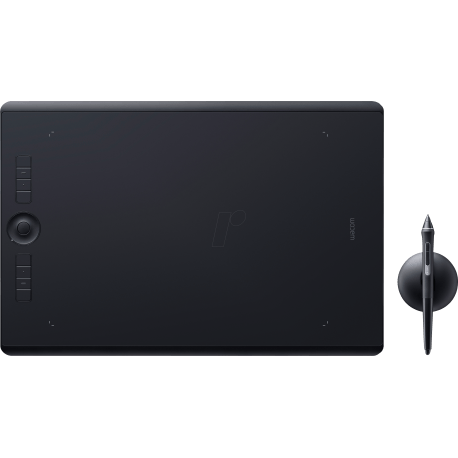
The tablet itself is sleek and compact, with a touch-sensitive surface that allows for multi-touch gestures. This means you can zoom, scroll, and navigate your artwork with ease. Furthermore, it has customizable ExpressKeys and a Touch Ring that provide quick access to your favorite shortcuts and commands, further enhancing your workflow efficiency.
Wacom Intuos Pro M: A Closer Look
The Wacom Intuos Pro Bluetooth comes in various sizes, including Small, Medium (M), and Large. I chose to test the Medium version, as it offers a good balance between workspace size and portability. With an active area of 224 x 148mm, it provides ample space for most creative tasks while still being compact enough to fit in a laptop bag.
The build quality of the Wacom Intuos Pro M is solid and feels premium. The tablet has a nice weight to it and sits comfortably on the desk without sliding around. The surface of the tablet has a slight texture to it, mimicking the feel of paper and providing a more tactile drawing experience.
Wacom Intuos Pro Medium vs Large: A Comparative Analysis
Choosing between the Medium and Large versions of the Wacom Intuos Pro Bluetooth can be tricky. Both offer the same features and performance, but differ in size and, consequently, price. The Medium version is more portable and affordable, making it an excellent choice for students, hobbyists, or professionals on the go.
On the other hand, the Large version offers a significantly larger active area, which can be beneficial for detailed work or multi-monitor setups. However, it comes with a heftier price tag and takes up more desk space. Ultimately, the choice between the two depends on your specific needs, preferences, and budget.
Pricing of Wacom Intuos Pro: Is it Worth the Investment?
Wacom is known for its high-quality drawing tablets, and the Intuos Pro Bluetooth is no exception. However, this quality comes at a cost. The pricing of the Wacom Intuos Pro can be a deterrent for some, especially when compared to cheaper alternatives on the market.
In my opinion, the investment is justifiable. The tablet’s performance, build quality, and features are top-notch, and it’s clear that Wacom has designed this device with professionals in mind. If you’re serious about your digital art, the Wacom Intuos Pro Bluetooth can be a valuable addition to your creative toolkit.
Unlocking the Potential of Wacom Intuos Pro Bluetooth
To truly unlock the potential of the Wacom Intuos Pro Bluetooth, you need to take full advantage of its features. The customizable ExpressKeys and Touch Ring can be a game-changer for your workflow, allowing you to access your favorite shortcuts and commands without having to reach for your keyboard.
The Pro Pen 2, with its high level of pressure sensitivity and tilt recognition, opens up a world of possibilities for digital art. From delicate sketches to bold strokes, the pen responds beautifully to your hand movements, making the drawing process feel incredibly natural and intuitive.
User Experience: Wacom Intuos Pro Bluetooth
My experience with the Wacom Intuos Pro Bluetooth has been overwhelmingly positive. The setup process was straightforward, and the tablet was responsive and accurate right out of the box. The Bluetooth connectivity has been reliable, and the battery life has been more than sufficient for my needs.
The Pro Pen 2 is a joy to use, and the tablet’s touch-sensitive surface and customizable features have significantly streamlined my workflow. While the price may be high, I believe the value and performance that this tablet offers make it a worthwhile investment for any serious digital artist.
Pros and Cons of Wacom Intuos Pro Bluetooth
Like any product, the Wacom Intuos Pro Bluetooth has its pros and cons. On the plus side, it offers excellent performance, high-quality build, and a wealth of features. The wireless connectivity is a big advantage, and the Pro Pen 2 provides an unmatched drawing experience.
The main downside of the Wacom Intuos Pro Bluetooth is its price. It’s a significant investment, especially for those on a tight budget. Additionally, some users may find the touch-sensitive surface too sensitive, leading to accidental inputs.
Who Should Buy Wacom Intuos Pro Bluetooth
The Wacom Intuos Pro Bluetooth is ideal for professional digital artists, designers, and illustrators who demand precision, control, and flexibility in their tools. It’s also a good choice for serious hobbyists or art students who are looking to upgrade their digital art setup.
However, due to its price, it may not be the best choice for beginners or those on a tight budget. There are cheaper tablets on the market that offer decent performance and features for those just starting out in digital art.


Conclusion: Final Thoughts on Wacom Intuos Pro Bluetooth
In conclusion, the Wacom Intuos Pro Bluetooth is a top-tier drawing tablet that offers an excellent combination of performance, features, and build quality. While its price may be steep, the value it provides makes it a worthwhile investment for serious digital artists.
Through this extensive review, I hope to have given you a comprehensive understanding of what this tablet offers and how it can contribute to your creative process.
If you’re interested in exploring further, check our Wacom Drawing Tablet collection at: https://www.m2.com.lb/product-category/computers-tablets/tablets/drawing-tablet/. Here, you’ll find a variety of options tailored to suit different needs and budgets. Whether you’re a seasoned professional or a budding artist, there’s a Wacom tablet for you. Happy creating!